No-Code vs Low-Code vs AI-Native: What's the Difference?
September 3, 2026PUBLISHED INAI Development
 ali
ali 2026-09-03 16:25:00
 0
0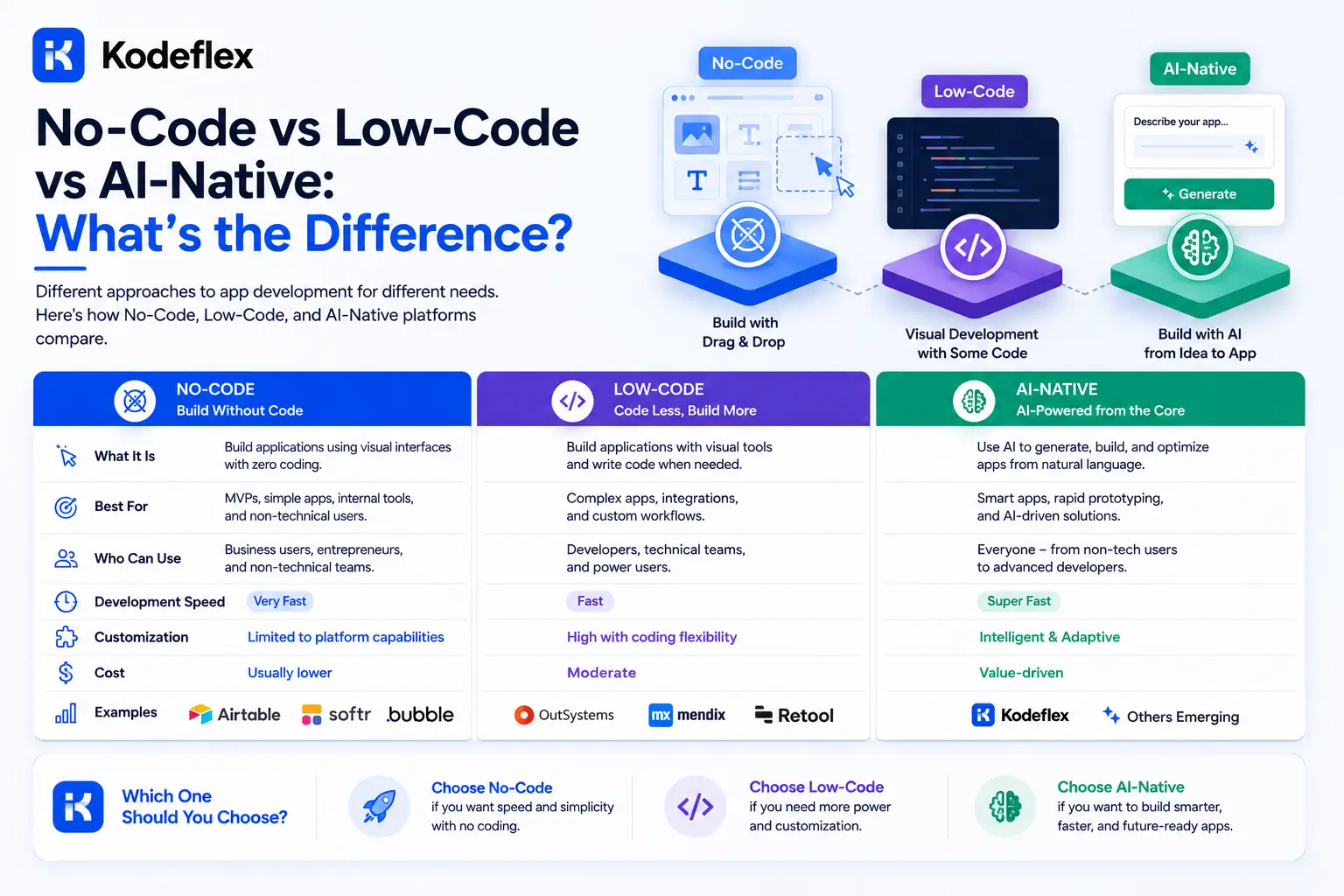
These three terms get used loosely enough that a lot of platforms could plausibly claim any of them. The real distinction isn't about how much code you're allowed to write, it's about where you start: an empty canvas, a visual builder with a code escape hatch, or a generated draft based on a description. Each starting point has real tradeoffs.
No-Code: Assembly Without a Blank Page Problem
No-code platforms replace writing code with visual assembly, dragging components onto a canvas, connecting them, configuring their behavior through menus rather than syntax. The ceiling here is real: once logic gets genuinely complex, multiple interacting conditions, unusual data relationships, no-code tools often hit a wall that requires plugins, workarounds, or accepting a less-than-ideal simplified version of what was actually needed.
Low-Code: Visual Building With an Escape Hatch
Low-code keeps the visual builder but adds the option to drop into actual code for anything the visual layer can't handle cleanly. This solves no-code's ceiling problem, but it reintroduces a real requirement, someone on the team needs to be comfortable writing and maintaining that code when it's used, which puts a lot of low-code platforms back in developer territory for anything beyond simple use cases.
AI-Native: A Different Starting Point Entirely
AI-native tools like KodeFlex don't start with an empty canvas or a component palette. They start with a plain-language description, and the AI generates the initial structure, forms, data model, and workflow logic, before any manual assembly happens. The visual canvas still exists in this model, but it's used for refining a working draft rather than building from nothing, which changes both the speed and the skill level required to get started.
Where Each Approach Actually Wins
|
No-Code |
Low-Code |
AI-Native |
|
|
Starting point |
Blank canvas, drag-and-drop components |
Visual builder plus optional custom code for complex logic |
AI-generated first draft from a description |
|
Who typically builds |
Business users, no technical background needed |
Developers, or technical business users |
Business users, describing the process in plain language |
|
Handling complex logic |
Often limited without plugins or workarounds |
Strong, since code can fill any gap |
Depends on the underlying workflow engine's depth |
|
Time to first draft |
Hours to days, manual assembly |
Days, requires more setup |
Minutes, generated from a description |
The Honest Caveat About AI-Native Tools
AI-native doesn't automatically mean more capable than low-code, it means a faster and more accessible starting point. How well an AI-native tool handles genuinely complex, branching business logic still depends entirely on the workflow engine underneath the generation layer. A weak engine with a good AI front-end will still hit real limits on complex processes, the AI generation speed doesn't compensate for a shallow underlying logic system.
Which One Actually Fits
If a technical team wants maximum control and doesn't mind writing code for complex pieces, low-code remains a strong, mature choice. If the need is simple, well-bounded, and unlikely to grow in complexity, no-code is often genuinely sufficient. If the goal is getting a non-technical team member from an idea to a working draft fast, without requiring anyone to learn a platform's internal logic model first, that's the specific gap AI-native tools are built to close.
Straight Answers
Is AI-native just a marketing term for no-code?
No, the meaningful difference is the starting point, a generated first draft versus manual assembly from an empty canvas, not just terminology.
Can low-code platforms eventually replace the need for AI-native tools?
They serve different priorities, low-code optimizes for developer control, AI-native optimizes for speed and non-technical accessibility. Neither fully replaces the other's specific strength.
Do AI-native tools still need a visual editor?
Yes, generally, the AI handles the first draft, but refinement still benefits from a visual canvas rather than requiring every adjustment to go through another generation prompt.
Is no-code always the simplest, least capable option?
Simplest to start, yes. Capability varies significantly by platform, some no-code tools handle more complexity than others despite the shared label.
Which category should a non-technical founder choose?
AI-native tools are generally built specifically for that use case, describing a need in plain language without first learning a platform's component model.
Want to see the AI-native starting point in action?
Visit KodeFlex or request a demo and describe the app you need.
Related Blogs
Best AI App Builder for Startups in 2026